
5 Things to Consider When Planning for Hour of Code™
The following is a guest post from Kiki Prottsman. You can watch her video session on this topic in The STEM Teachers Club Membership.
Computer Science Education Week is coming!
CSEd week is an event that happens every year during the second week of December. Its goal is to introduce computer science to students and teachers who might not otherwise think they need it in their lives. One sub-event that happens during this week is the Hour of Code™, where people are challenged to try coding for one hour in hopes that they’ll learn that coding is not as complicated as it sounds.
The truth is, the ideas behind computer science relate to problem-solving in general, so students who dig into CS skills often have a better time handling unexpected issues across every subject. Some of those big ideas include:
Trying many solutions until you find one that works
Hunting down bugs and trying different ways to fix them
Thinking through problems sequentially
Breaking big issues down into easier pieces
Working with others to get different viewpoints
Accepting that different variables could change the outcome of a situation
While most aspects of computer science won’t be digested immediately, some become sparks that light later in life when students better understand how coding connects to the real world. Even a single coding experience can prepare a young child to accept the idea that they’re capable of writing and creating programs later in life.
Surprisingly, the process of bringing an hour of computer science into your classroom is extremely easy as long as you ask yourself a few simple questions in advance.
How much time will I have?
Does your class meet for 30 minutes? 60 minutes? 90 minutes? Each of those segments requires a different kind of activity for students to feel satisfied.
If your time together is shorter than an hour, go for something quick and easy without too many “deep” learning experiences. Exposure to vocabulary in the context of gameplay is enough for first exposure.
If your time is longer than an hour, make sure there’s a creative “sandbox” (or project level) where students can dig as deeply as they want. This will help keep students from feeling overwhelmed by content on their first day.
For a regular hour-long lesson, you can take your pick of nearly any of the experiences that have been created specifically for the Hour of Code™.
How much time do I have to prepare?
If you have an hour or less to prepare, try to stick to online lessons that self-grade. Most Code.org lessons fall into this category.
If you have two to three hours to prepare, you can run nearly any unplugged lesson or most Hour of Code lessons.
If you have more than three hours to prepare, try combining a couple of lessons together. Not only will this give your students a customized experience, it will help make sure that you are prepared to handle some of the questions that could come up during execution.
How well do my students read?
For non-readers, stick to games that show instead of tell. Creators like Scratch Jr., CodeSpark, and Lightbot follow this structure, just to name a few.
For light readers, choose an experience with drag and drop blocks, instead of text programming. These include many Code.org games, Tynker, Scratch, and MakeCode.
For advanced readers, try a JavaScript or Python game like Codemonkey, CodeMonster, or Grasshopper by Google.
Will they need an account?
Some games require students to have an account, even if it’s free. This can be a big deal in schools, so if you want to keep your students from having to log in, choose something that makes an account optional.

What’s your end goal?
Do you want to come out of this experience with students who think that coding is great and are willing to give it another shot one day, or do you want to be able to check off some standards and quiz your students on facts that they learned? If your goal is the former, lean into it and make sure you choose something that will have your students patting themselves on the back by the end of the hour. If your goal is the latter, make sure to choose something with an existing lesson plan and clearly stated objectives. Both types exist, and some fall into both categories!
In the end, you know your classroom best. Taking just a few minutes to understand your situation will make a world of difference to your students during Computer Science Education Week. And, who knows, you might help ignite a passion that lasts a lifetime.
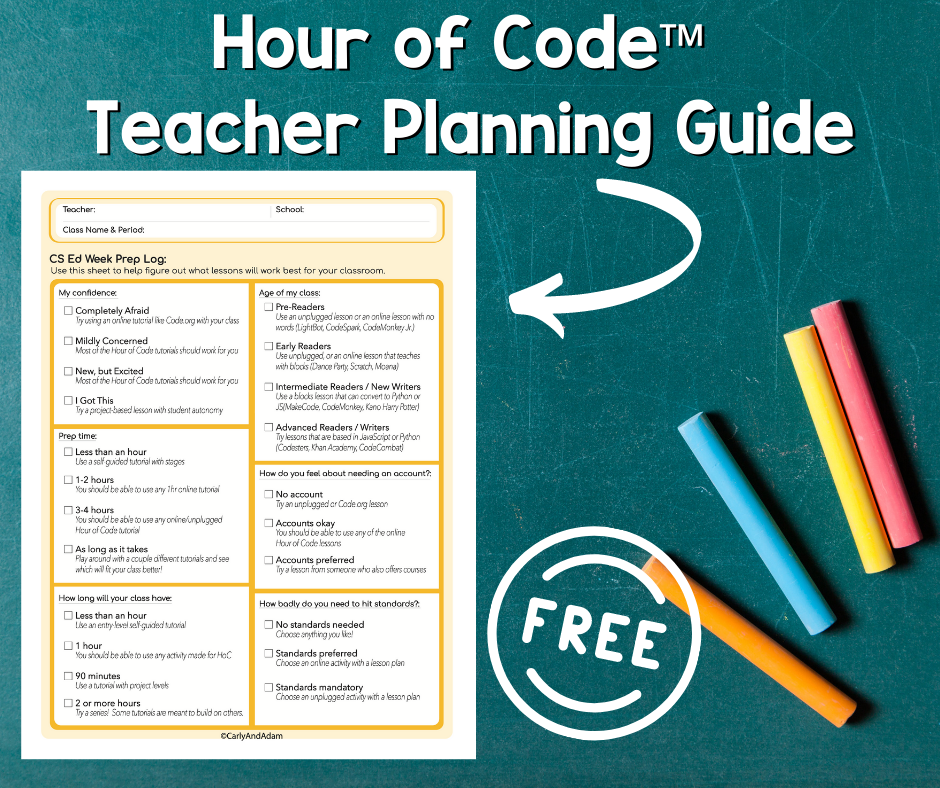
Want more tips to help plan for Hour of Code™?
Get access to the full training video when you join The STEM Teachers Club!
We hope you have found this blog post helpful. To stay connected with Carly and Adam's teaching tips and classroom freebies be sure to follow us on Facebook, Pinterest, Teachers Pay Teachers, and subscribe to our blog!
