
Using Seesaw for STEM Distance Learning
The following is a guest post from Rachael Lehr, a Seesaw Ambassador, digital technologies leader, and host of #PrimarySTEMChat:
As educators around the globe grapple with our ‘new normal’, and the need to instruct our students remotely, one thought has stayed with me consistently; “I am so glad our school has Seesaw as a digital portfolio platform, and I am so thankful for all the hours I have invested over the past four to five years in ensuring our teachers are confident with using this amazing digital tool and that nearly all of our students have families connected in Seesaw at home.”

In Perth, Western Australia, our journey into remote learning is in its infancy, and we still have a few students at school currently [those whose parents are working and have no options to care for them]. However, over the past few weeks we have been busily planning for remote learning for our primary (elementary) students - in both online and offline forms - and communicating with the almost 500 students who are now at home and missing being at school.

Seesaw is working out to be a real plus for a few reasons:
It is a communication conduit to our families where we can quickly update them on what is happening at the school, to share resources that may be valuable for them for learning at home and to assist in retaining connections - especially when everyone is feeling quite anxious and stressed about what may happen. Seesaw is a great communication tool, as it allows us to share pictures, videos, pdf documents, web links and more. Responses to public ‘announcements’ (which go to all connected families) are private and this then opens a channel for conversations with individual family members. Simply, it is an easy form of communication.
It is the perfect tool for teachers to create and share activities that align with our curriculum for students to complete at home. Students have access to a range of tools to complete activities (drawing, labeling, recording, photos, videos, stickers etc.) and this also allows for differentiation of activities, whereby students can work at their own level. Our teachers have been busy creating a library of activities that will then be ‘scheduled’ for release in Seesaw once our autumn break is over. When teachers create these activities, they can have written, verbal or video instructions, which the students can come back to easily at any point in the activity, as they complete. Activity instructions can also include links to web pages, online videos and more, to support instruction before completing activities. At home, students can see the activities that have been posted for them to complete, they add a response and then the teacher gets an unapproved item to review, give feedback (written or verbal) on and approve. Activities can also be shared to the school library and teachers have access to a plethora of incredible activities that teachers around the globe have shared to the Seesaw Activities Library also.
Seesaw also lends itself beautifully to continuing to connect and build relationships with our students and families. Teachers are planning to share daily check in/ hello videos, as well as instructional videos, story reading etc. While these videos wont be ‘live’ on this platform, they can be posted to the journal and students can respond underneath. If videos are sent via announcements, then students can respond with video responses of their own.

I can highly recommend Seesaw to any educator, it is a platform I have been using in my science classroom for at least four years, and allowed us to go ‘paperless’ due to the brilliant way it allows for ‘app-smashing’ and sharing learning from many digital platforms via Seesaw to our families.
I am always happy to help anyone with advice in relation to using Seesaw and welcome connections via Twitter @rachaellehr or email Rachael.Lehr@education.wa.edu.au
I wish you all well with your journey into remote learning, whichever stage you are at. Remember, you are amazing and you are doing incredible things in challenging circumstances.
Resources and Examples:
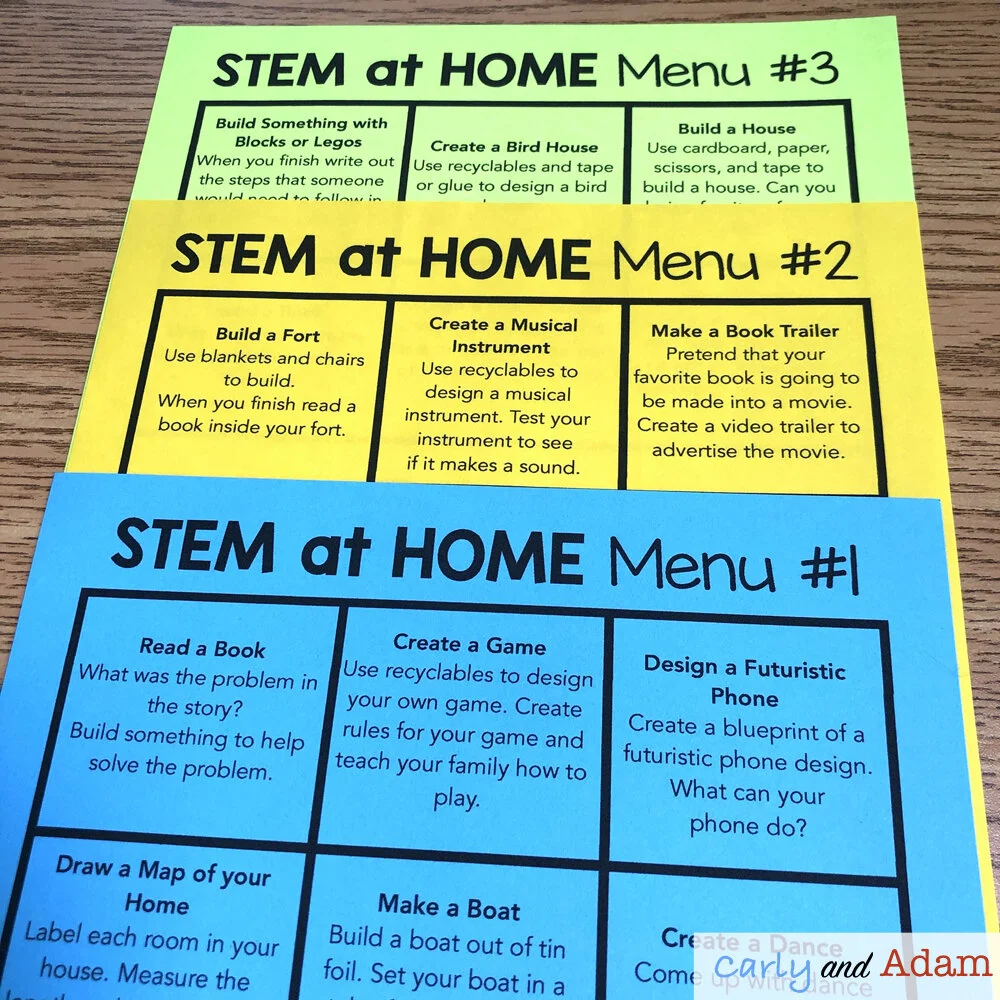
Carly and Adam’s STEM at Home Menus Use these menus as inspiration for STEM challenge ideas on Seesaw.
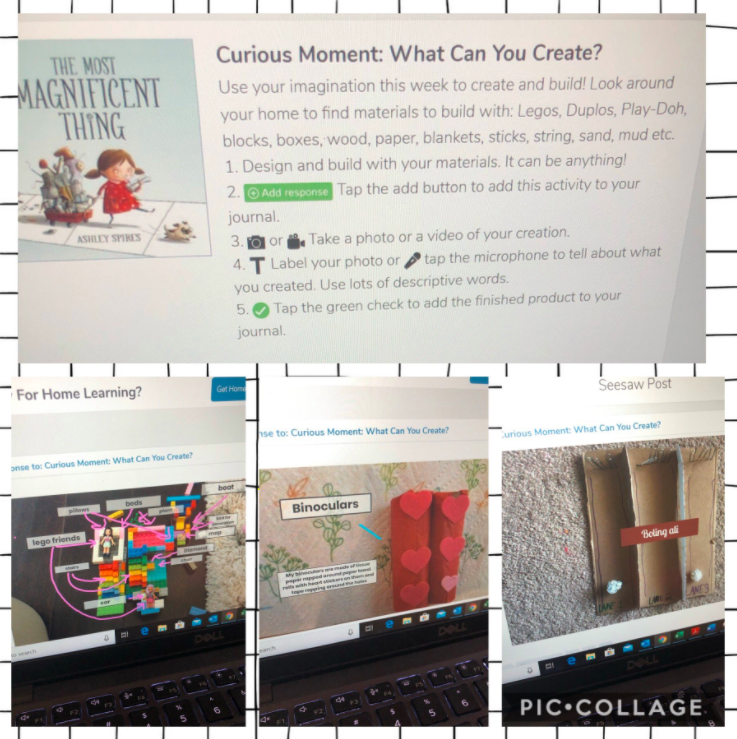
This curious moment STEM Challenge idea was shared on Twitter by Shemaiah Kincaid. The best part about this challenge is that students are able to use whatever materials they have available at home. Follow Shemaiah on Twitter @Kincaid3rdgrade for more STEM distance learning ideas using Seesaw.
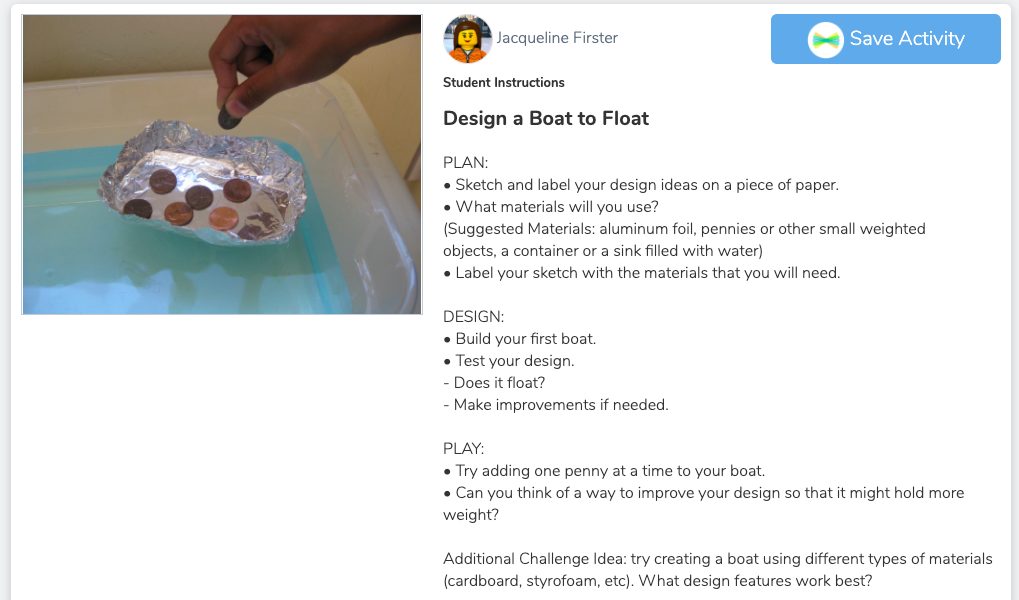

You can also find more STEM challenges in the Seesaw activity library. The following are a couple example lessons from Jacqueline Firster:
Design a Boat to Float: https://app.seesaw.me/pages/shared_activity?share_token=EYMnAHDmTbu7JRLDUYl9xQ&prompt_id=prompt.d0e30ce4-3304-4d4c-b234-e6975845dc70
Genius Hour Intro Lesson: https://app.seesaw.me/pages/shared_activity?share_token=_qRShBrqRm-1XOxw3JSa3Q&prompt_id=prompt.68c30797-a839-4a0a-8917-990b1927e7ee
Follow Jacqueline on Twitter @STEM_K12 for more STEM distance learning ideas using Seesaw.
Also, make sure you check out the most current information straight from Seesaw here:
Seesaw has some great videos on their Youtube channel that will assist educators with getting started with Seesaw or setting up for remote learning. https://www.youtube.com/channel/UCYUfnb7MIsGald-Xtig9Umw/featured
They also have an incredibly helpful web page with lots of tips and tricks for navigating remote learning with Seesaw. https://web.seesaw.me/remote-learning-for-teachers
Join our FREE Facebook group Elementary STEM Teachers with Carly and Adam! Learn more about how to incorporate STEM in your classroom or at home and collaborate with other STEM teachers! JOIN NOW!

We hope you have found this blog post helpful. To stay connected with Carly and Adam's teaching tips and classroom freebies be sure to follow us on Facebook, Pinterest, Teachers Pay Teachers, and subscribe to our blog!